


If you’re just starting out in the world of batch scripting, getting hands-on experience is key to mastering the basics. In this article of Batch Scripting Basics for Beginners – Part 1, we’ll guide you through 7 exercises designed to help you understand the fundamentals of batch programming while creating some interesting and interactive scripts.
RELATED VIDEO
Mastering Batch Script Commands
| Command | Description |
@Echo off | Disable command echoing for cleaner console output. |
cls | Clear console screen. |
Set /p | Prompt user for input. |
Set /A | Perform arithmetic operations. |
If | Execute commands conditionally. |
Dir | List contents of a directory. |
For | Iterate over files or commands. |
Echo | Display messages or write data to files. |
Usebackq | Use backquotes for command or file path identification. |
Exercise 1: Displaying “Hello, World!”
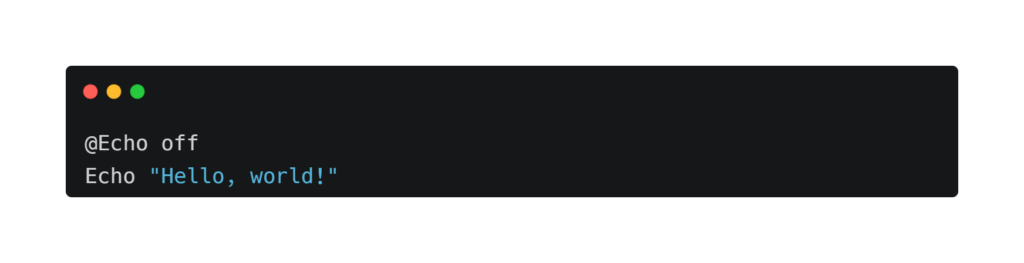
Explanation: Ever heard of the classic “Hello, World!” message? It’s like the first hello you exchange when entering a new world. With a simple command (@Echo off) to keep things tidy, we make sure our message shines bright on the screen.
Exercise 2: Personalized Greeting

Explanation: Imagine walking into a room and being greeted by name – it’s personal and warm. This script does just that! By asking for your name (Set /p _Name="Your Name:"), it crafts a special greeting just for you. And with a clean slate (cls), the stage is set for your grand entrance.
Exercise 3: Calculating the Sum of Two Numbers

Explanation: Numbers, numbers everywhere! But fear not, for this script turns math into child’s play. Just type in two numbers, hit enter, and voila! The script adds them up (Set /A _Sum=%_Num1%+%_Num2%), giving you the total in a snap.
Exercise 4: Checking Even or Odd

Explanation: Ever played detective with numbers? Now’s your chance! This script is like your trusty sidekick, helping you determine whether a number is even or odd. Using a clever trick (Set /A _Remainder=%_Num% %% 2), it solves the mystery in a blink.
Exercise 5: Creating an Empty File

Explanation: Need a blank canvas for your next masterpiece? Look no further! This script lets you summon an empty file with just a few keystrokes. With a sprinkle of magic (Echo.>%_Filename%), the file appears, ready for your creative genius.
Exercise 6: Listing Files in a Directory

Explanation: Ever wondered what hides in the depths of a folder? This script is your guide, revealing all the files within. With a wave of its wand (Dir /b "%_path%"), it unveils the treasures, making navigation a breeze.
Exercise 7: Counting Lines in a Text File

Explanation: Lost in a sea of words? Fear not, for this script is here to count your lines. Like a diligent librarian, it meticulously tallies up the lines in a text file, giving you the total in a flash.
Important Notes
- Each script begins with
@Echo offto suppress echoing commands to the console, providing a cleaner output. - The
clscommand clears the screen before executing each script, ensuring a neat presentation. - User input is obtained using
Set /pcommand, allowing for interactive execution. - Arithmetic operations are performed using
Set /Acommand. - File operations are carried out using commands like
Echo,Dir, andFor.
With these exercises, you’ll not only gain a better understanding of batch scripting basics but also have some fun creating interactive and useful scripts. Experiment with these examples, modify them, and let your creativity flow to unlock the full potential of batch programming. Happy scripting!


Hallo, ek wou jou prys ken.
Hello George,
Nice to hear from you. Please write to me on my email: karanveerchouhan@gmail.com
Aloha, makemake wau eʻike i kāu kumukūʻai.
Hola, volia saber el seu preu.
Hi, I wanted to know your price.
Прывітанне, я хацеў даведацца Ваш прайс.